

Account and data
Export or delete your data and account
Your designs and pictures are yours to manage. You can take a copy of your data at any time, delete what you no longer need, or delete the whole account.
In this guide
Download a copy of your data
Step 1: Open your account
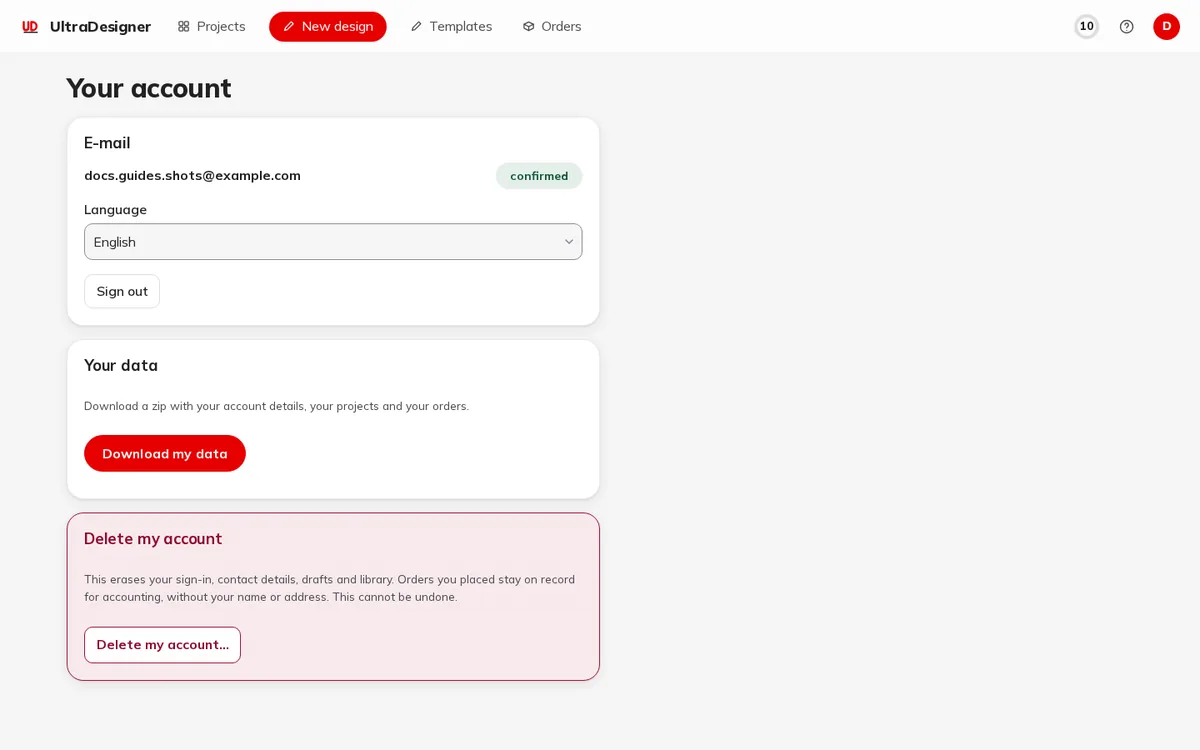
Sign in and open Your account.
Step 2: Download
Under Your data, click Download my data. You get a zip with your account details, your projects and your orders.
Delete pictures and projects
- Pictures: in the Library, Delete a picture and confirm with Confirm delete. A picture still used in a design is not deleted; the app tells you which design uses it.
- Projects: on the Projects page, open the project card menu and choose Delete.
Delete your account
Step 3: Start the deletion
On Your account, under Delete my account, click Delete my account….
Step 4: Confirm
Enter Your password and type DELETE in Type DELETE to confirm, then click Delete everything.
In the app's words: This erases your sign-in, contact details, drafts and library. Orders you placed stay on record for accounting, without your name or address. This cannot be undone.
Without an account
As a visitor, your designs and pictures exist only in this browser. Clearing the site data in your browser deletes them. For how we handle personal data, see the privacy page.
Screens and prices in the pictures are examples; the app always shows the current price before you pay.
Written for the app as of 2026-10-27.